How to Efficiently Roll Out Windows for Your Business Environment
In today’s fast-paced business environment, efficiently rolling out Windows can significantly impact overall productivity and user satisfaction. As organizations increasingly rely on digital tools, the need for a seamless and effective deployment process has become paramount. Rolling out Windows involves not just installing the operating system but also ensuring that all applications, settings, and user preferences are configured correctly to meet the specific needs of each team.
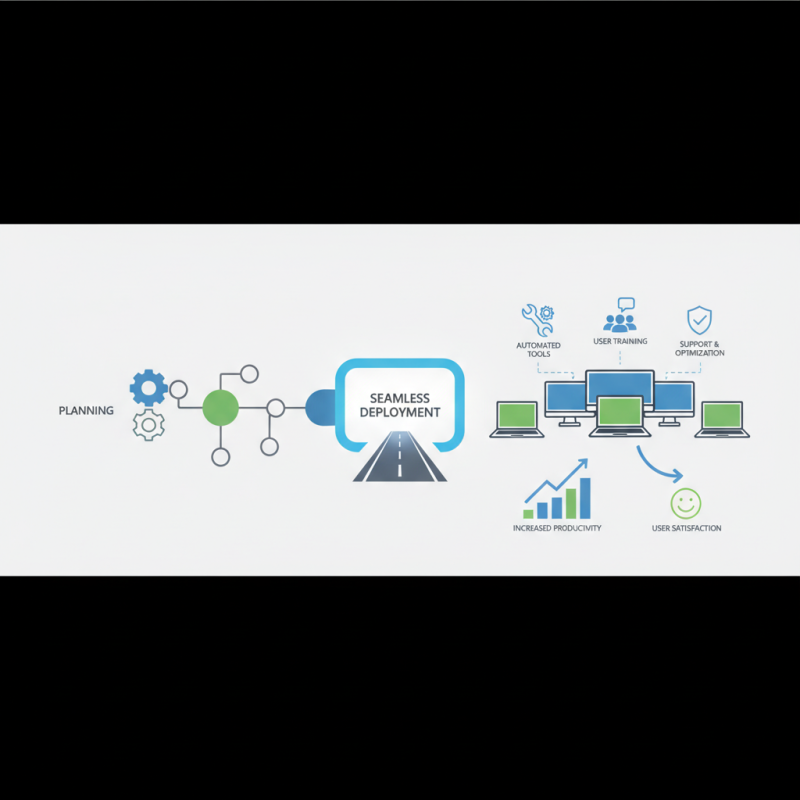
The challenges associated with this process can be multifaceted, ranging from hardware compatibility issues to user training and support. Therefore, businesses must adopt a strategic approach to mitigate these challenges and streamline their deployment efforts. This entails thorough planning, utilizing automated tools, and providing adequate training resources to users. By focusing on these key aspects, organizations can facilitate a successful roll out of Windows that enhances operational efficiency and improves the overall user experience. Understanding the best practices for rolling out Windows will empower businesses to optimize their IT infrastructure while minimizing disruptions during the transition.
Understanding the Importance of Efficient Windows Rollout in Business
In today’s fast-paced business environment, the efficient rollout of Windows operating systems is paramount. Studies by industry analysts indicate that a streamlined deployment process can reduce downtime by up to 50%, allowing employees to return to productivity sooner. This efficiency is crucial not only for operational cost savings but also for minimizing disruptions in services, customer interactions, and project timelines. Effective Windows rollout strategies help businesses maintain continuity and leverage the full potential of their systems.
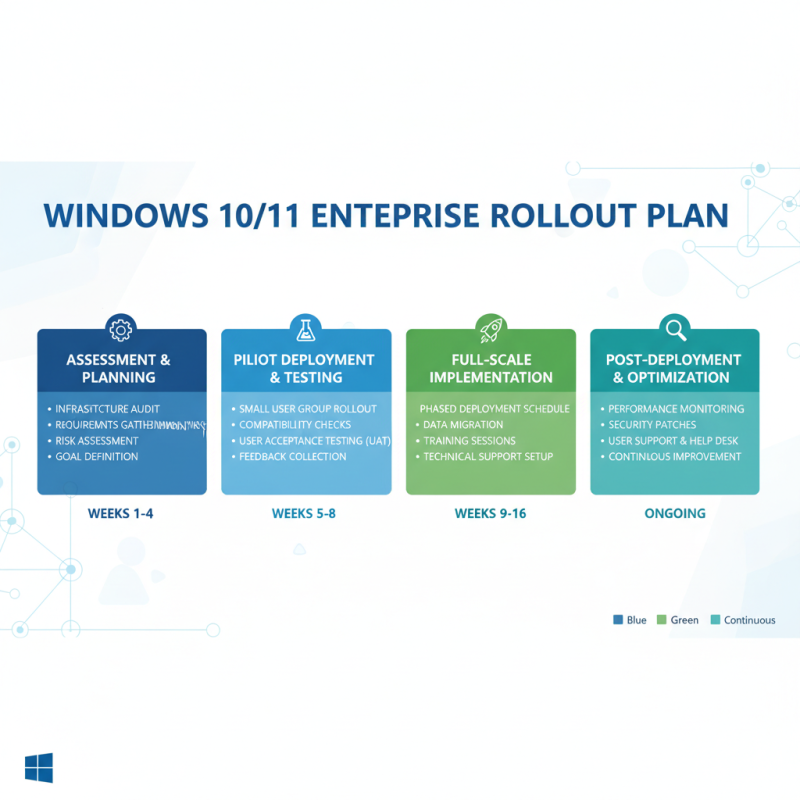
To ensure a smooth and efficient rollout, consider implementing a clear communication plan. This involves informing all stakeholders, providing timelines, and setting expectations around the transition. Additionally, conducting a pilot test with a select group of users can help identify potential issues before the full-scale deployment, thus decreasing the risk of operational hiccups.
Tips for a successful rollout include: First, invest in robust training sessions to familiarize employees with new features and changes. A well-informed team is less likely to face difficulties. Secondly, leverage automation tools that can aid in system configuration and software installation, reducing manual errors and saving time. Lastly, maintain a feedback loop post-deployment to address any challenges quickly and improve future rollout processes.
Windows Rollout Efficiency in Business Environments
Assessing Your Current Infrastructure and Software Needs
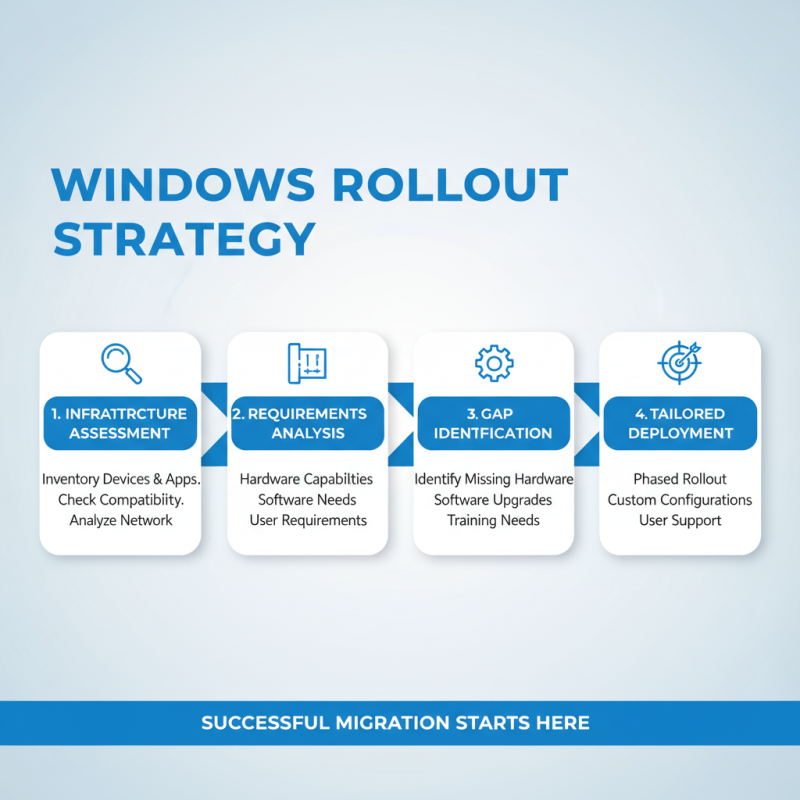
To effectively roll out Windows in your business environment, the first step involves a comprehensive assessment of your current infrastructure and software needs. Understanding the existing hardware capabilities, network architecture, and user requirements is crucial for a successful migration. Start by inventorying all devices and applications currently in use, checking their compatibility with the new operating system. This foundation allows you to identify potential gaps and ensures your rollout is tailored to meet the specific needs of your business.
**Tips:** Consider conducting surveys or interviews with employees to gather insights into their daily software requirements and challenges. This feedback can highlight essential applications that need prioritization during the rollout process. Additionally, analyzing performance metrics of existing systems can provide valuable data, guiding you in making informed decisions about upgrades or replacements.
Once the assessment phase is complete, it's essential to develop a strategic plan for implementation. This plan should address not only the technical aspects of the rollout but also the training and support your staff will require. Creating a timeline for the transition, along with designated support resources, can streamline the process and enhance user adoption.
**Tips:** Establish a testing phase before the full rollout to identify any unforeseen issues with applications and workflows. Pilot testing with a small group can help mitigate risks and refine your rollout strategy based on real user feedback. Remember, proactive communication with your team about expected changes and benefits will also foster a smoother transition.
Creating a Comprehensive Rollout Plan and Timeline
Creating a comprehensive rollout plan and timeline for deploying Windows in your business environment is crucial for minimizing disruptions and ensuring a smooth transition for all users. Begin by assessing your current infrastructure and determining the specific needs of your organization. Involve key stakeholders from various departments to gather input on user requirements, potential challenges, and preferred features. This collaborative approach will help tailor a rollout plan that addresses the unique dynamics of your business.
Once you have gathered sufficient information, outline a detailed timeline that includes critical milestones such as hardware upgrades, installation phases, user training sessions, and feedback collection points. Segment the rollout into manageable phases—starting with a pilot program for select teams before a wider deployment. This allows you to troubleshoot potential issues and refine your approach based on real-world usage. Establish clear communication channels to keep all employees informed of the rollout schedule, expectations, and support resources available to them. This not only builds anticipation but also ensures that users feel supported throughout the transition process.
Implementing Training and Support for Staff During the Transition
During a major transition like rolling out a new operating system, the importance of
training and support for staff cannot be overstated.
As employees navigate the unfamiliar landscape of updated features and functionalities,
a comprehensive training program is essential.
This program should be designed to cater to different learning styles, offering a mix of
hands-on workshops,
interactive online modules, and easily accessible resources
such as FAQs and video tutorials. By providing varied training options,
businesses can ensure that all employees, regardless of their technical proficiency, feel confident
and competent as they adapt to the new environment.
Furthermore, ongoing support is crucial during this transition period.
Establishing a dedicated helpdesk or support team can provide employees with immediate assistance
when they encounter issues, fostering a sense of security and reducing frustration. Regular feedback
sessions can also be beneficial, allowing staff to voice their concerns and share their experiences.
This not only helps identify common challenges but also enables the organization to tailor support
strategies to address these specific needs effectively.
By prioritizing training and support, businesses can facilitate a smoother transition,
ultimately enhancing overall productivity and morale during the rollout process.
Monitoring and Evaluating the Rollout Process for Continuous Improvement
Monitoring and evaluating the rollout process is crucial for ensuring a smooth transition to a new operating system in a business environment. This involves setting clear metrics and benchmarks that align with the organization's goals. By utilizing key performance indicators (KPIs), such as user adoption rates, system performance, and error frequency, businesses can gauge the effectiveness of the rollout. Regular feedback from employees during this phase is invaluable, as it provides real-time insights into any challenges faced and areas needing improvement.
Continuous improvement should be an ongoing process. After the initial rollout, it is essential to conduct thorough assessments of the deployment across various departments. This can include surveys, interviews, and usage analytics to identify common pain points. Based on this data, organizations can implement targeted training sessions, adjust support resources, and refine processes to enhance user experience. By fostering a culture of open communication and responsiveness, businesses can not only improve the current rollout but also prepare for future technology transitions more effectively.